> For the complete documentation index, see [llms.txt](https://help.1024proxy.com/llms.txt). Markdown versions of documentation pages are available by appending `.md` to page URLs; this page is available as [Markdown](https://help.1024proxy.com/1024/1024proxy/unlimited-residential-traffic-bandwidth/api.md).
# API
### 1024Proxy API功能介绍
API功能为有编程能力的用户提供了更加便捷的操作方式。可以通过修改API参数快速筛选提取自己需要的代理IP。使用1024Proxy API更常被应用于数据抓取等需要高频切换IP的业务场景。
### 快速了解
 ### 如何使用1024Proxy的API功能
{% stepper %}
{% step %}
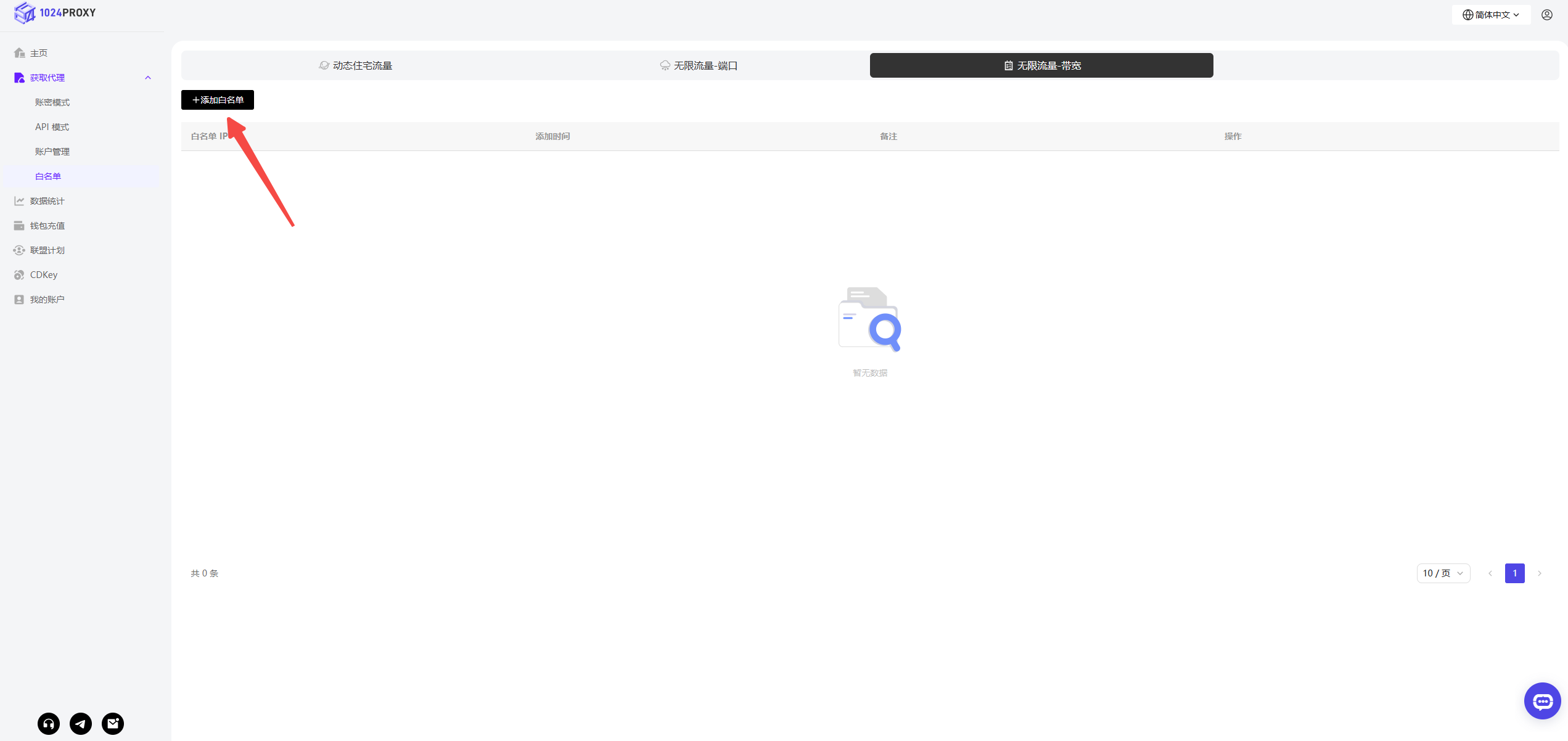
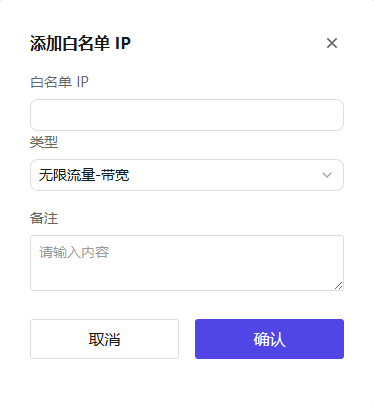
### 添加本地公网IP至IP白名单,点击按钮【添加白名单】
### 如何使用1024Proxy的API功能
{% stepper %}
{% step %}
### 添加本地公网IP至IP白名单,点击按钮【添加白名单】
 {% endstep %}
{% step %}
### 完成无限流量-带宽 套餐的购买
返回API模式菜单下,选中无限流量-带宽,我们可以查看到当前已经添加我们的本地公网IP至IP白名单中。点击立即购买跳转到套餐购买页,完成无限流量-带宽的套餐购买。

选择需要的套餐类型,1024Proxy当前的无限流量-带宽套餐提供多种有效期选择包括:3小时、1天、7天、30天等多种有效期选择,能够满足用户的广泛的业务需求。
{% endstep %}
{% step %}
### 设置筛选条件或者参数
完成购买后点击进入控制台进入API模式,
{% endstep %}
{% step %}
### 完成无限流量-带宽 套餐的购买
返回API模式菜单下,选中无限流量-带宽,我们可以查看到当前已经添加我们的本地公网IP至IP白名单中。点击立即购买跳转到套餐购买页,完成无限流量-带宽的套餐购买。

选择需要的套餐类型,1024Proxy当前的无限流量-带宽套餐提供多种有效期选择包括:3小时、1天、7天、30天等多种有效期选择,能够满足用户的广泛的业务需求。
{% endstep %}
{% step %}
### 设置筛选条件或者参数
完成购买后点击进入控制台进入API模式,
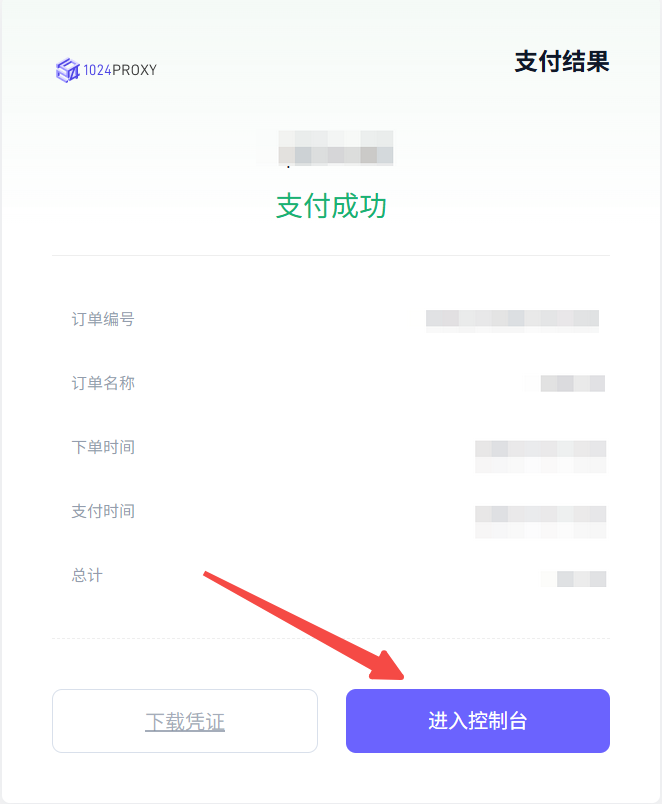 可以查看到我们购买的无限流量-带宽设备及对应的截止日期。
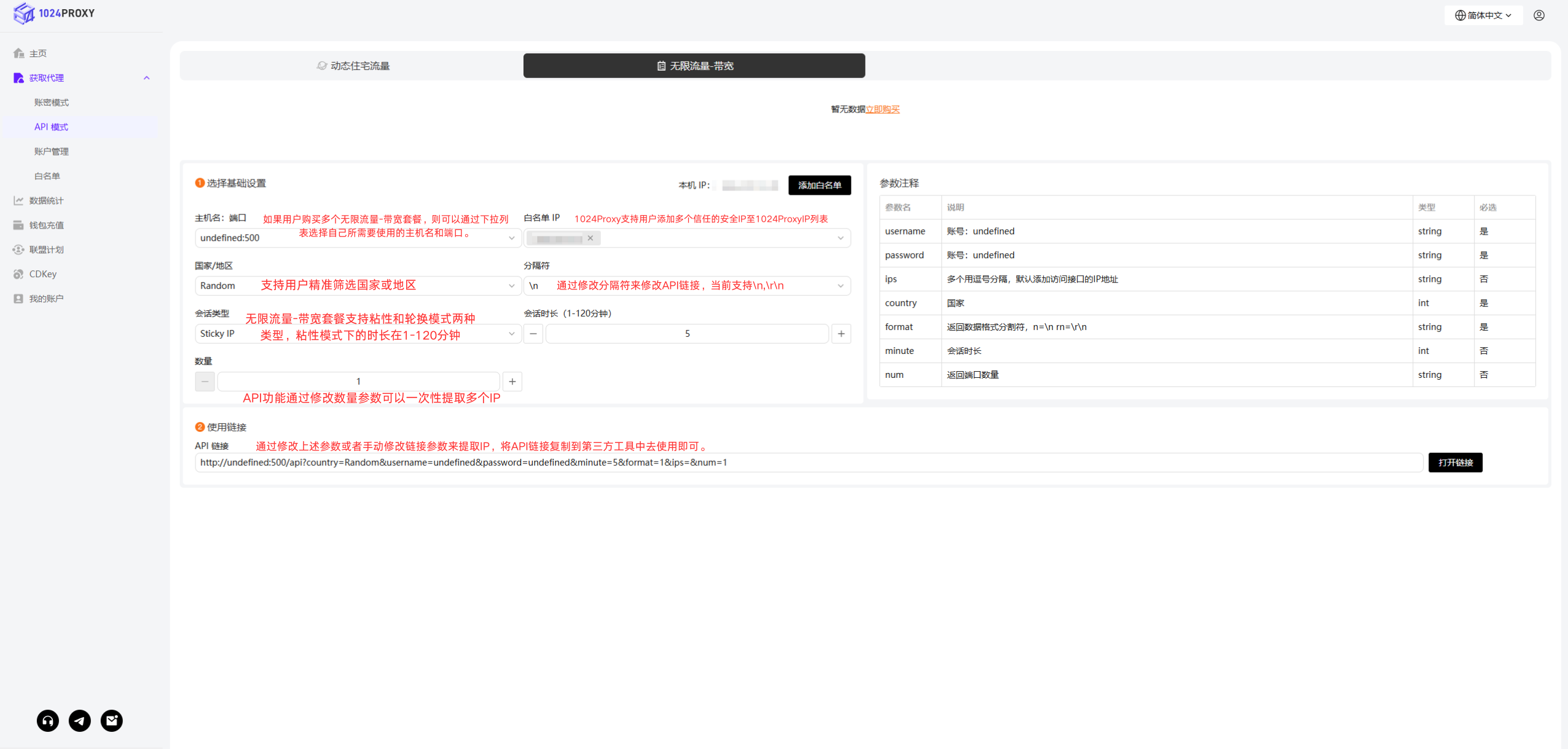
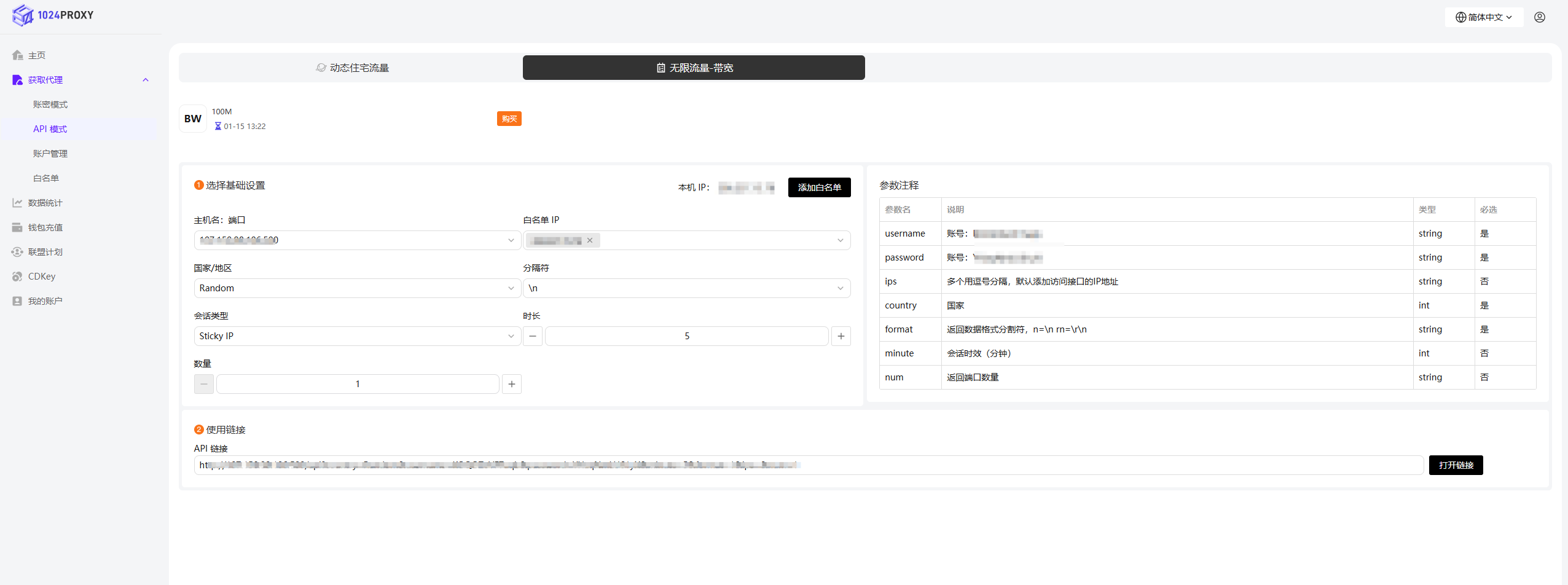 通过修改下面的参数完成API的基础设置后即可使用API链接批量修改提取自己需要的IP。
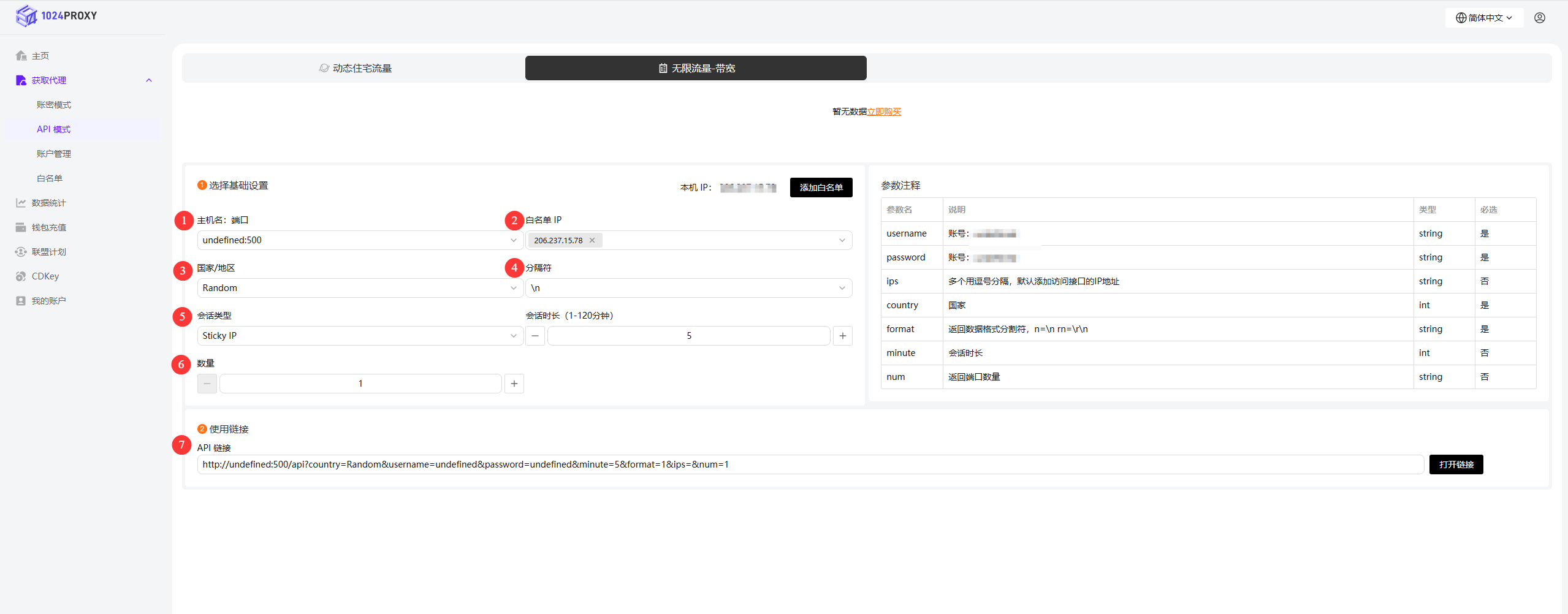 1. 主机名:端口:在完成购买无限流量-带宽套餐后会发放一个云设备到用户的账号中,如果用户购买多个无限流量-带宽套餐,则可以通过下拉列表选择自己所需要使用的主机名和端口。
2. 白名单IP:上面我们已经将本地的IP添加到白名单列表之中。1024Proxy支持用户添加多个信任的安全IP至1024ProxyIP列表中,从而实现多人协作。通过填写IP白名单,省略了用户名和密码的校验,能够有效地节省时间提高工作效率。
3. 国家/地区:1024Proxy的无限流量-带宽支持用户精转筛选国家或地区。
4. 分隔符:通过修改分隔符来修改API链接,当前支持\n,\r\n。
5. 会话类型:无限流量-带宽套餐支持粘性和轮换模式两种类型,粘性模式下的时长在1-120分钟。
6. 数量:API功能通过修改数量参数可以一次性提取多个IP
7. 使用链接:通过修改上述参数或者手动修改链接参数来提取IP,将API链接复制到第三方工具中去使用即可。
{% endstep %}
{% endstepper %}
### 参数注释
| 参数名 | 说明 | 类型 | 必选 |
| -------- | ---------------------- | ------ | -- |
| username | 账号:USENAME | string | 是 |
| password | 账号:PASSWORD | string | 是 |
| ips | 多个用逗号分隔,默认添加访问接口的IP地址 | string | 否 |
| country | 国家 | int | 是 |
| format | 返回数据格式分割符,n=\n rn=\r\n | string | 是 |
| minute | 会话时效(分钟) | int | 否 |
| num | 返回端口数量 | string | 否 |
1. 主机名:端口:在完成购买无限流量-带宽套餐后会发放一个云设备到用户的账号中,如果用户购买多个无限流量-带宽套餐,则可以通过下拉列表选择自己所需要使用的主机名和端口。
2. 白名单IP:上面我们已经将本地的IP添加到白名单列表之中。1024Proxy支持用户添加多个信任的安全IP至1024ProxyIP列表中,从而实现多人协作。通过填写IP白名单,省略了用户名和密码的校验,能够有效地节省时间提高工作效率。
3. 国家/地区:1024Proxy的无限流量-带宽支持用户精转筛选国家或地区。
4. 分隔符:通过修改分隔符来修改API链接,当前支持\n,\r\n。
5. 会话类型:无限流量-带宽套餐支持粘性和轮换模式两种类型,粘性模式下的时长在1-120分钟。
6. 数量:API功能通过修改数量参数可以一次性提取多个IP
7. 使用链接:通过修改上述参数或者手动修改链接参数来提取IP,将API链接复制到第三方工具中去使用即可。
{% endstep %}
{% endstepper %}
### 参数注释
| 参数名 | 说明 | 类型 | 必选 |
| -------- | ---------------------- | ------ | -- |
| username | 账号:USENAME | string | 是 |
| password | 账号:PASSWORD | string | 是 |
| ips | 多个用逗号分隔,默认添加访问接口的IP地址 | string | 否 |
| country | 国家 | int | 是 |
| format | 返回数据格式分割符,n=\n rn=\r\n | string | 是 |
| minute | 会话时效(分钟) | int | 否 |
| num | 返回端口数量 | string | 否 |