> For the complete documentation index, see [llms.txt](https://help.1024proxy.com/llms.txt). Markdown versions of documentation pages are available by appending `.md` to page URLs; this page is available as [Markdown](https://help.1024proxy.com/unlimited-residential-traffic-bandwidth/ip-whitelist.md).
# IP Whitelist
### What is the IP Whitelist Feature in 1024Proxy?
IP Whitelist is a proxy usage method provided by 1024Proxy that allows authentication without using a username and password.
In addition to the common Username & Password Authentication mode, the IP whitelist provides users with a more convenient and efficient authorization solution.
By adding a trusted local outbound IP address to the IP whitelist, the system will automatically recognize the request source. As long as the request comes from an IP within the whitelist, you can directly call the API interface and use the proxy IP without entering a username and password in the request, thereby simplifying the configuration process.
#### Core Advantages of IP Whitelist
✅ No account and password authentication: No need to expose usernames and passwords in code or tools\
✅ Easier configuration: Suitable for fixed servers or cloud hosting environments\
✅ Secure and controllable: Only whitelisted IPs are allowed to access proxy resources\
✅ More suitable for automation: Reduces parameter configuration and lowers the risk of errors
For users with fixed outbound IPs, the IP whitelist is a more stable and secure usage method.
### Applicable Scenarios
The IP whitelist mode is particularly suitable for the following scenarios:
Automated scripts and crawler programs\
Avoid hardcoding account passwords in code and improve security
Enterprise-level or multi-project usage\
Multiple services can call the proxy through the same outbound IP, making unified management more convenient
High-concurrency API call scenarios\
Reduce authentication steps and improve request efficiency and stability
Businesses with high security requirements\
Prevent account password leakage or misuse
### How to Use the IP Whitelist?
{% stepper %}
{% step %}
### Obtain Your Local Outbound IP
Before using the IP whitelist, please confirm the public outbound IP address of your current device or server.\
You can obtain it by visiting an IP query website or executing relevant commands on your server.
{% endstep %}
{% step %}
### Add the IP to the Whitelist
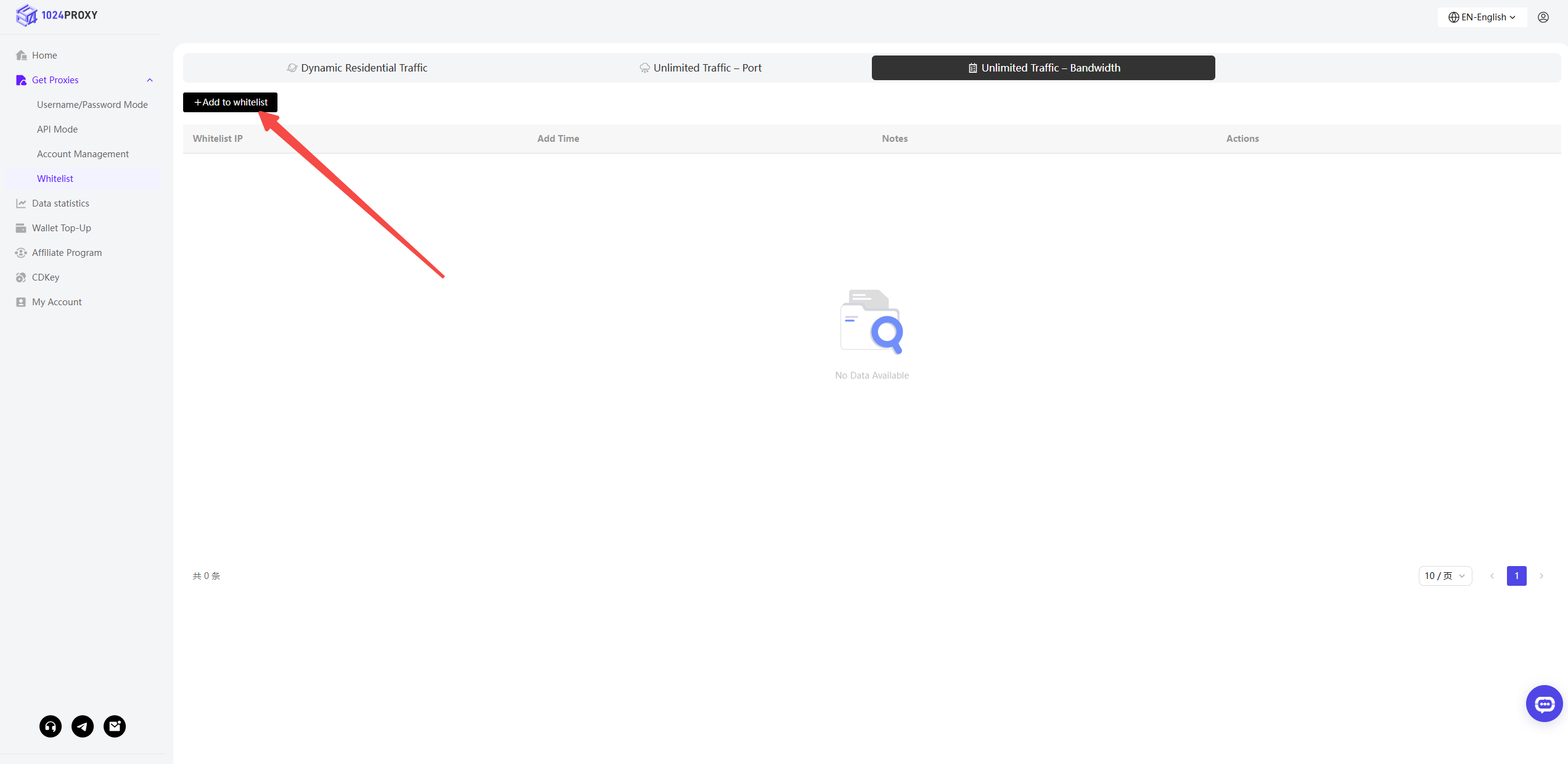
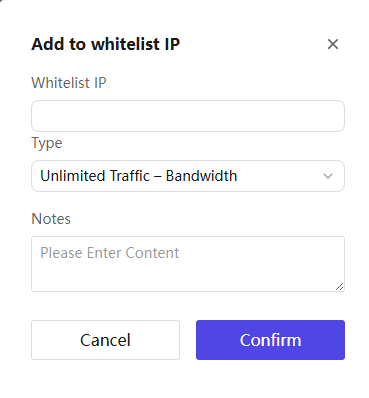
Log in to the 1024Proxy user dashboard, go to the IP Whitelist page, add your public IP address to the whitelist, and save the settings.
{% hint style="warning" %}
Note:
* Only public IP addresses are supported
* If your IP address changes, you need to update the whitelist in time, otherwise the proxy will not work properly
{% endhint %}
{% endstep %}
{% step %}
### Directly Call the Proxy or API
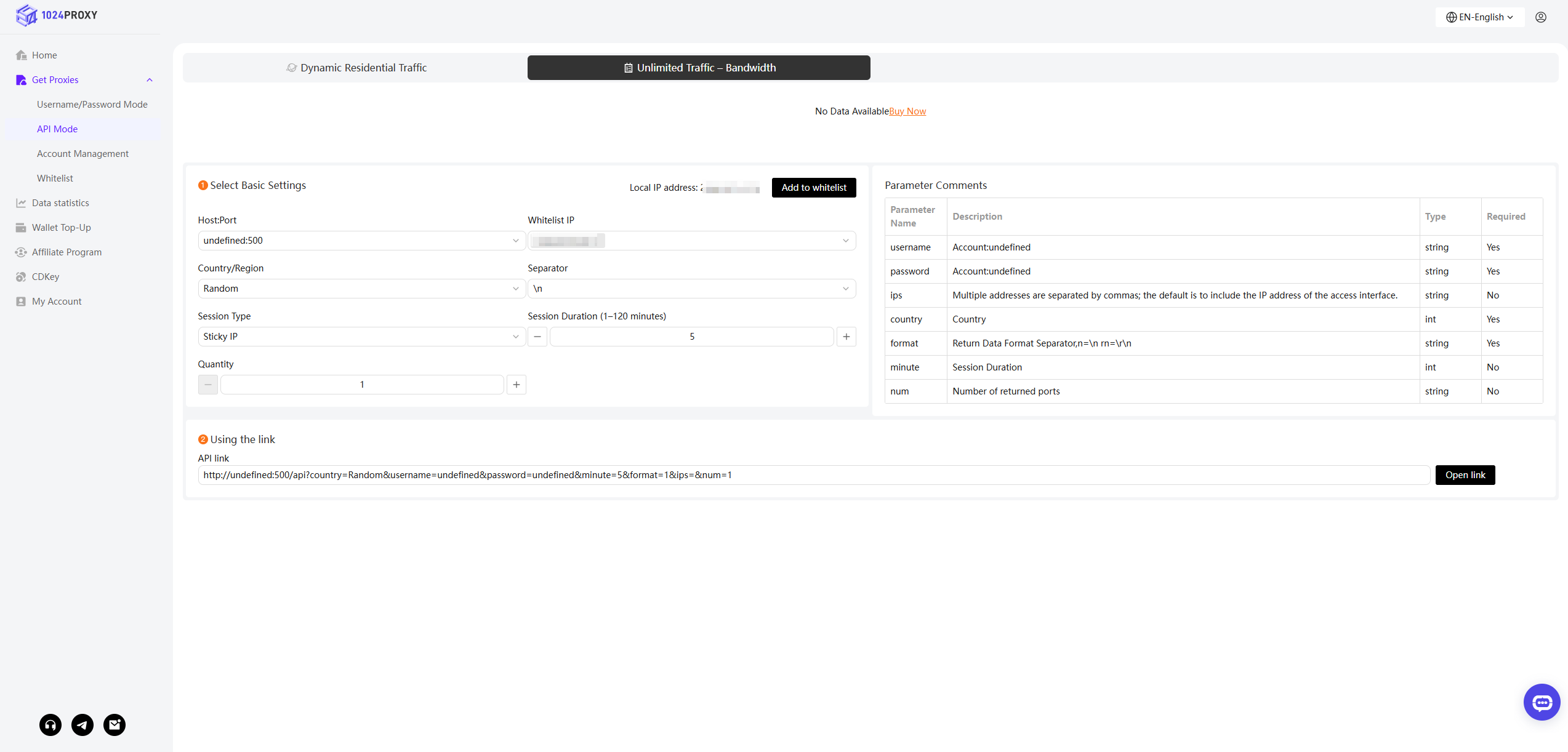
After successfully adding the IP to the whitelist, you can call the API in API mode without providing username and password parameters. The system will automatically complete identity verification based on the request source IP.
This method is especially suitable for long-running programs and server-side services, and can significantly reduce configuration complexity.
{% endstep %}
{% endstepper %}
#### Usage Recommendations and Precautions
● It is recommended to only add trusted fixed IPs to the whitelist\
● Do not add dynamic IPs or public network IPs at will\
● Regularly check and clean up IPs that are no longer in use\
● If multiple servers are used, add the corresponding outbound IPs separately